berth: ports your agents and your terminal agree on
I run a lot of Claude Code sessions at once. Each one is working in its own repository, and each one, sooner or later, starts something that listens: a Vite dev server, a Next app, a Postgres container, a mail sink. Vite wants 5173. Next wants 3000. Postgres wants 5432. The first session gets the port. The second gets address already in use and does one of two things, both bad.
It increments. Now the app is on 3001, the summons email it just sent still points at 3000, and the agent reports success. Or it clears the way: kill whatever is on 3000, which was another session's server, mid-test. Either way, nobody on the machine, human or agent, can answer the only question that matters: who holds 3000, and is it safe to stop?
This is the same problem as putting LLMs into production, just on a laptop: once several agents share a machine, you need a deterministic rule they all follow and a record anyone can check, not their best guesses. berth is the small tool I built to provide that. It is open source, it runs on macOS and Linux with Node 20, and it is a Claude Code plugin, so an agent session gets it for free.
The number is the rule
Most port registries hand out numbers from a table. berth does not have a table to remember, because the number is the record:
port = 10000 + 1000·P + 100·W + R
P is the project's permanent number, 0 to 29. W is the git worktree, 0 for the main checkout. R is the role: 00 web, 01 api, 02 db, 03 cache, 04 smtp, 05 mail-ui, 06 docs, 07 worker, 08 and 09 for OpenTelemetry, and 10 to 99 for anything a project names itself.
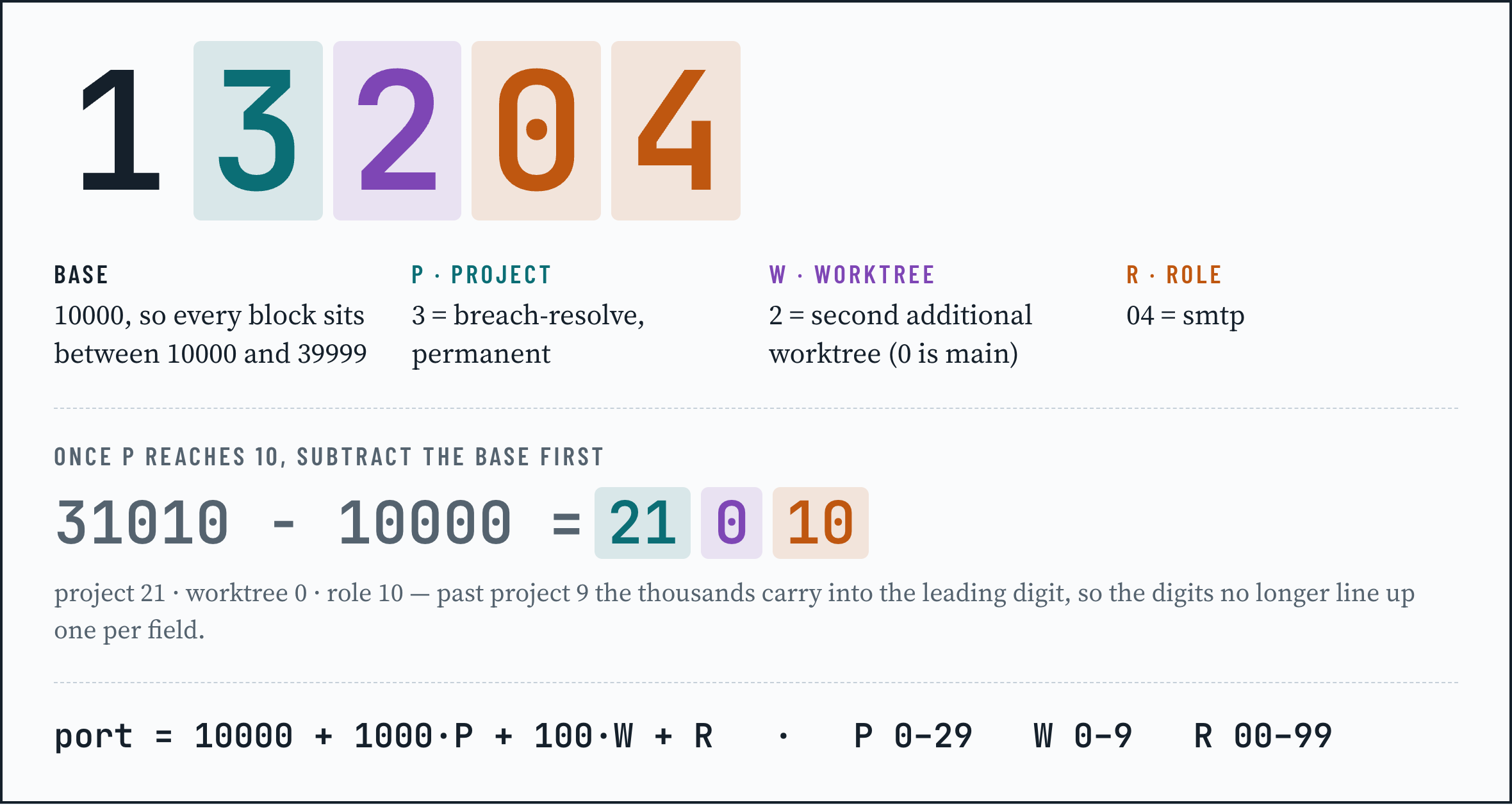
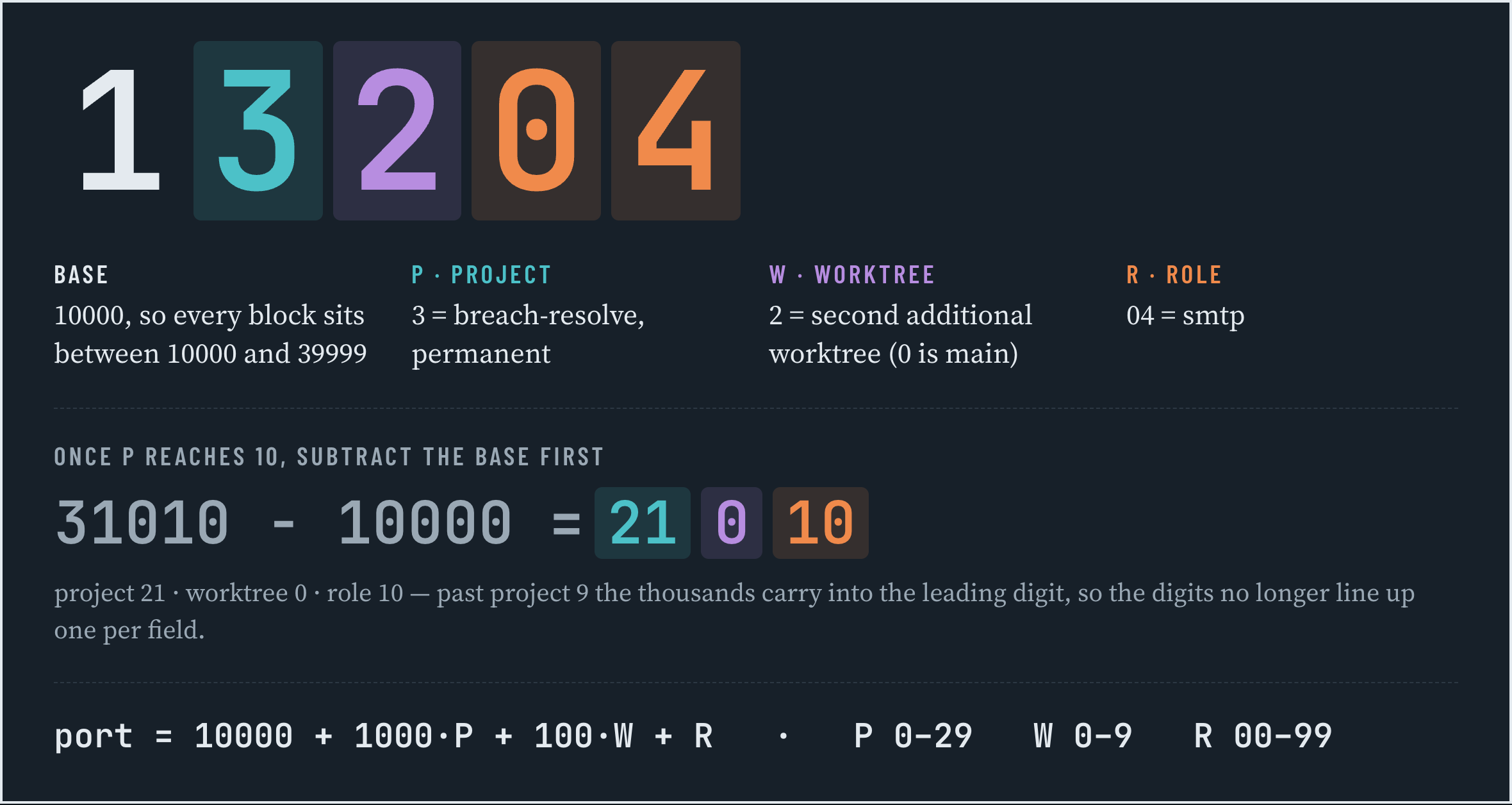
So reading a port is decoding it: subtract the base, then read what is left as P, W, R. 13204 − 10000 = 3204, so project 3, second worktree, the SMTP sink.
Subtract first, because for the first ten projects the digits happen to line up one per field and it is tempting to read them straight off the number. That stops at project 10, where the thousands carry into the leading digit. 31010 − 10000 = 21010: project 21, worktree 0, role 10 — not project 1, as the digits alone suggest.
Every project owns a thousand ports it can never collide inside, every worktree owns a hundred, and the numbers never change because P is permanent. Scratch servers that need no name come from a separate pool, 40000 to 41999, with an eight-hour lease.
Advisory, never enforcement
berth does not proxy traffic, does not run a daemon, and does not kill anything. It keeps a ledger of leases (who claimed which port, from which session, for what), then reconciles that ledger against what is really listening, using lsof, netstat, Docker's Compose labels, and the session marker Claude Code puts in every process it spawns. Containers behind Colima or Docker Desktop are attributed too, not blamed on the VM's port proxy.
Each port ends up in one of nine states, and each state comes with exactly one suggested command:
| state | meaning | berth suggests |
|---|---|---|
| ok | leased and bound by its owner, or attributed by evidence | nothing |
| idle | leased, nothing bound yet | nothing |
| stale | leased, owner process is gone | berth release |
| overstay | scratch lease past its TTL, claiming process gone, server still bound | berth project add |
| orphan | leased, the checkout no longer exists | berth release |
| unmanaged | bound in a block with no lease and no attribution | berth adopt |
| squatter | bound inside another project's block | berth who |
| conflict | lease owner and live holder disagree | berth who --json |
| drift | a config declares a port outside its allocation | berth scan --write |
The suggestion is all it does. berth free refuses to signal a process another session owns, and the commands with teeth (free, anything with --force, adopting a port as a human) are refused outright when the caller is an agent session rather than a person at a terminal. The rule "berth never kills" holds even when the session running it is wrong.
What an agent session sees
With the plugin installed, every Claude Code session starts with its ports already in context, before it has run a single command:
## Ports (berth)
Project berth (P=0) owns 10000–10999. This checkout is W0 (main) → 10000–10099.
Ports: web 10000 · api 10001 · db 10002 · cache 10003 · smtp 10004 · mail-ui 10005 …
Exported for this session: PORT, WEB_PORT, API_PORT, DB_PORT, … ; BERTH_BLOCK=10000-10099.
Shared observability (owned by skills-telemetry; do not start another): grafana 3000 · prometheus 9090 · …
Rules: pass the port explicitly (--port $PORT, vite --strictPort); never let a framework pick one.
The hook that injects that is read-only and budgeted at 180 ms, so it never slows a session down. The same plugin puts berth on the session's PATH, exposes six MCP tools (berth_env, berth_who, berth_check, berth_claim, berth_release, berth_ls), and ships two skills. The one I use most is onboarding. In a repository berth has never seen:
register this repo in berth
The agent assigns the next free project number, records the ports the repo already hardcodes (from Compose files, Vite and Next configs, .env), exports the new numbers, and writes a launch config for the desktop preview pane. Nothing is renumbered and nothing outside that repository is touched. When it finds a container that was started by hand rather than through Compose, it says so and shows the recreate command instead of writing an override that could never apply.
Using it from a terminal
Install once, register each repository once:
npm install -g @amiable-dev/berth
berth init                                   # starting policy in ~/.config/berth/policy.toml
cd ~/projects/my-app && berth project add .  # permanent number, ports found in your configs
Then let your shell follow you. This hook exports PORT, API_PORT, DB_PORT and friends when you cd into a registered project and unsets them when you leave, spawning berth only when the project root changes:
# ~/.zshrc
eval "$(berth shell-init zsh)"
Day to day, four commands cover almost everything:
berth check              # what is listening, who holds it, what needs attention
berth who 5432           # decode, live holder, and the evidence for it
berth claim --role api   # record that this session is about to bind API_PORT
berth env --dotenv       # PORT=13000, DB_PORT=13002 … for an app that reads .env
For Compose, the pattern that works with and without berth is the interpolated host port. The file keeps standard numbers as its default, and a berth shell moves them:
services:
  postgres:
    ports:
      - "${DB_PORT:-5432}:5432"
If you would rather not touch the file, berth env --compose-override writes an override with the same effect.
The map
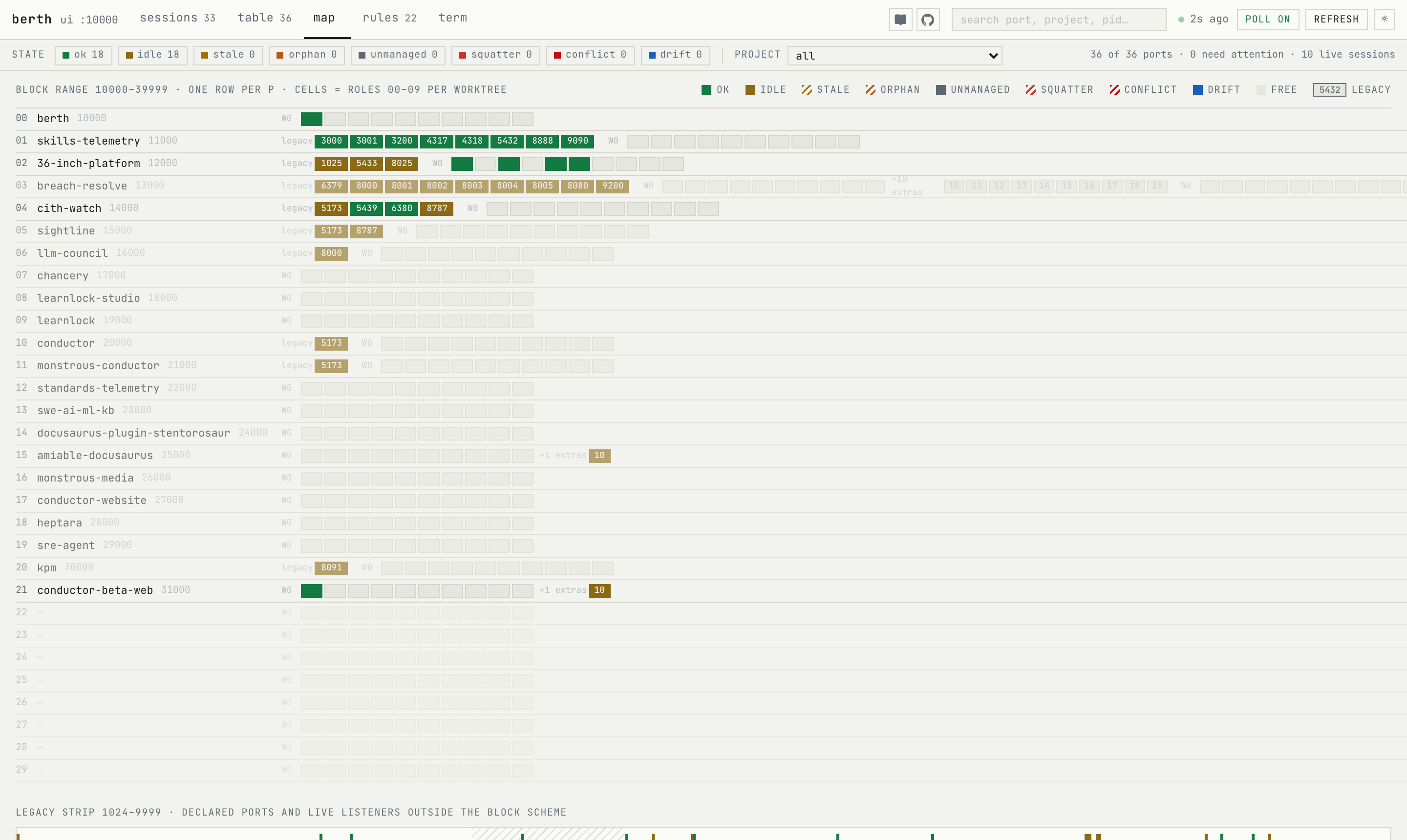
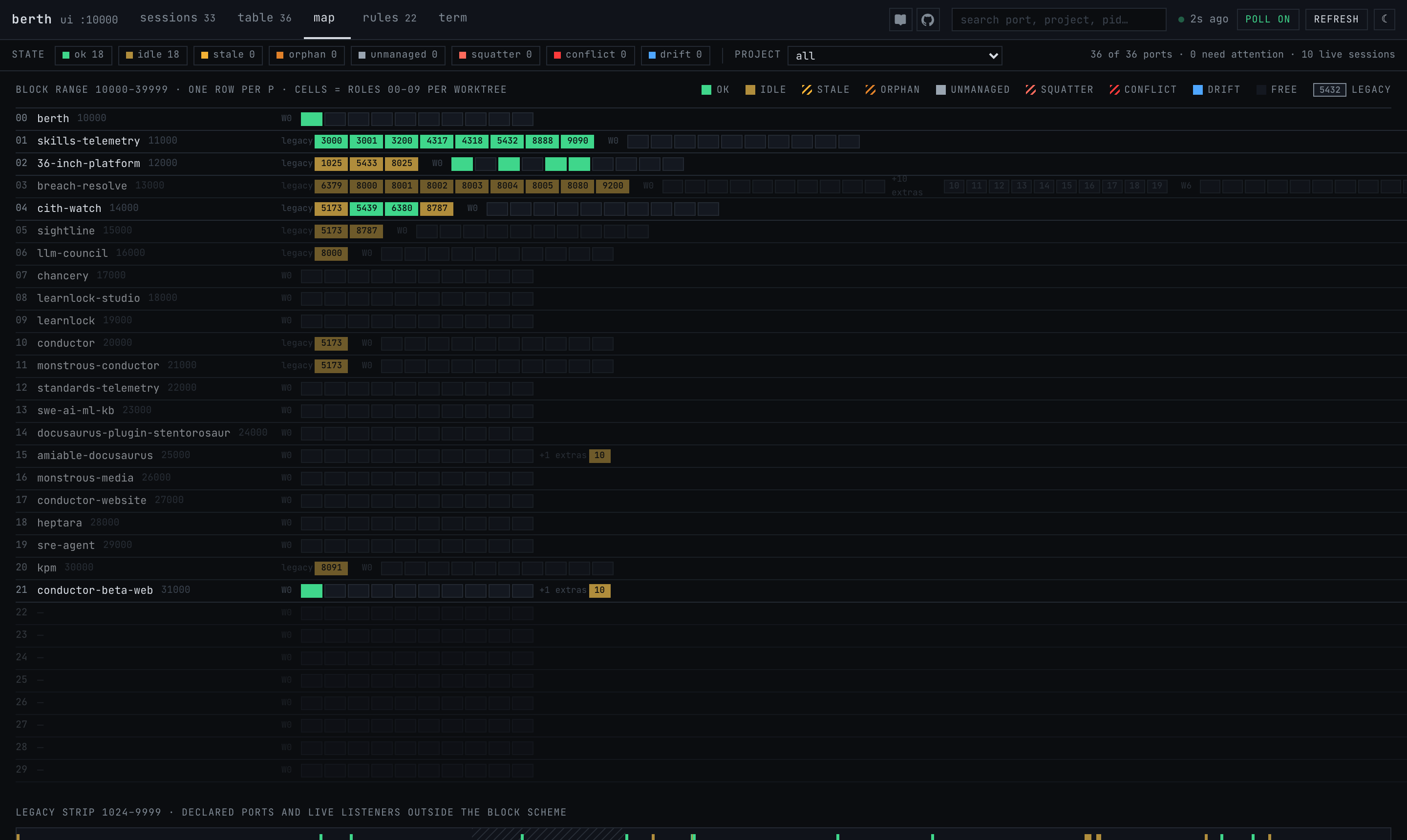
berth ui serves a small dashboard on the project's own web port. The map view is one row per project: live legacy ports as numbered cells on the left, then the ten role cells per worktree, coloured by state, and after those any extras the project named for itself, each carrying its two-digit slot. Click a cell and the drawer shows the lease, the live holder, and every piece of evidence behind the verdict.
When a migration leaves debris behind (a stale lease for the old port, say), the agent runs berth tidy --dry-run and shows you the plan; you run berth tidy once from your own terminal to apply it.
What it deliberately does not do
No proxy, no DNS, no daemon, no cloud. It does not rewrite your application's config. There is a written design for that — per-tool recipes, where an agent proposes the diff and a human applies it — but it is still a proposed architecture decision rather than something shipped, and even once it lands the edit stays a pull request you read. And it never decides a process should die.
Try it
- Docs: https://amiable-dev.github.io/berth/
- Source: https://github.com/amiable-dev/berth (MIT; the design document and nine architecture decision records are in the repo)
- npm:
@amiable-dev/berth
If your machine has more than one agent on it, the first berth check is usually enough to see why this exists.